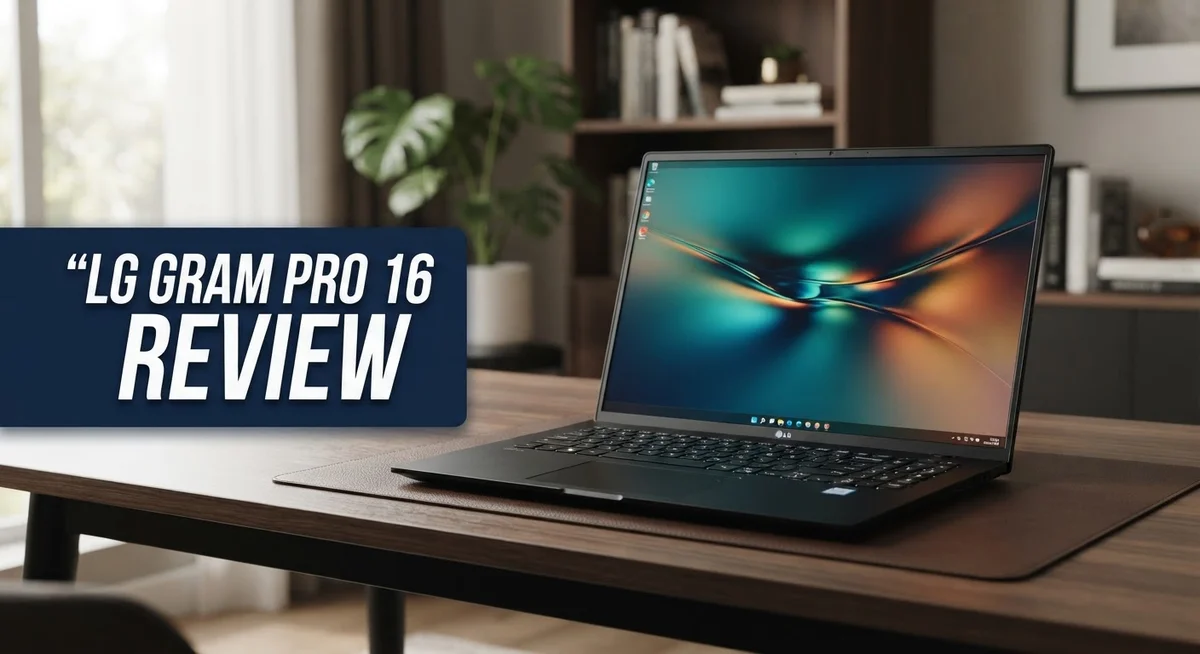
Looking for a laptop that feels light as air but still packs a punch? The LG Gram Pro 16 might be your answer.
This laptop stands out in a crowded market. It carries a stunning OLED display. Colors pop and contrast feels sharp on screen.
Battery life impresses too. You get about 11 hours of use on a single charge. That means less time near power outlets and more time working or streaming.
But no laptop is perfect. The trackpad feels small. The hinge could use more tightness. Speakers sound weak compared to rivals like the Dell XPS 15 or Asus ProArt P16.
This review breaks down every detail. We look at specs, performance, and real world use. You will learn if this laptop fits your daily needs.
Let’s explore what makes the LG Gram Pro 16 a strong contender in the 2-in-1 space.
In a Nutshell
Here is the quick summary for anyone short on time.
- Display quality shines. The 16 inch OLED screen delivers rich color and deep contrast. Movies and photos look stunning on this panel.
- Processor choice matters. You can pick AMD Ryzen AI 7 or Intel Core Ultra chips. Both options handle daily tasks smoothly.
- Memory and storage flex. RAM ranges from 16GB to 32GB LPDDR5x. Storage goes up to 2TB SSD for large files.
- Trackpad feels tight. The trackpad size feels small for a 16 inch laptop. Typing feels fine but clicking takes some adjustment.
- Hinge needs work. The hinge does not feel as tight as it should. This causes slight wobble when you type fast.
- Sound falls short. Speakers sound thin and lack punch. You may want headphones for movies or music.
This laptop mixes strong visuals with a few rough edges. It competes with models like the Dell XPS 15 and Asus ProArt P16. Keep reading to see if it fits your needs.
Design and Build Quality
The LG Gram Pro 16 proves that lightweight doesn’t mean flimsy. The chassis combines magnesium and plastic materials to achieve that feather light 2.7 lb weight while maintaining structural integrity. You’ll notice minimal flex when you hold it or type on the keyboard.
The thin bezels around the 16 inch display give the laptop a modern, premium appearance. LG packed the screen real estate without bloating the overall footprint. The result feels more spacious than traditional 16 inch laptops you might compare it against.
Build materials show thoughtful engineering. The magnesium frame provides strength where it matters most. The plastic components keep weight down without sacrificing durability in daily use. This balance between materials works better than you’d expect from the specs alone.
The hinge design lets you flip the screen into tent mode or tablet position. However, the hinge feels loose compared to competitors. It wobbles slightly when you adjust the screen angle. This looseness doesn’t break functionality, but it does reduce that premium feel you want from a high end machine.
The keyboard deck sits flat and solid. Typing feels stable even on soft surfaces like couches or beds. The key travel provides decent feedback without bottoming out too hard.
Port placement follows practical design logic. Connections sit on the sides where you actually need them. Cable management becomes easier since ports don’t crowd one corner.
The overall aesthetic leans professional rather than flashy. The silver finish resists fingerprints better than glossy alternatives. The understated design works in office settings and casual environments alike.
Weight distribution matters for comfort. The light chassis means you can hold it one handed for brief periods without strain. Longer sessions feel less fatiguing than heavier 16 inch models. This advantage becomes obvious if you move between rooms or travel frequently.
The build quality sits in the middle ground. It feels sturdier than budget laptops but not quite as premium as some competitors in this category. The lightweight approach required material compromises that show through in everyday use.

- Intel Core Ultra 7 355 AI Performance: Powered by the Intel Core Ultra 7 355 processor with...
- 32GB LPDDR5X RAM & 1TB Gen4 SSD: Equipped with 32GB LPDDR5X dual-channel memory for smooth...
Last update on 2026-11-01 / Affiliate links / Images from Amazon Product Advertising API
Display and Visual Performance
The 16 inch OLED display serves as the star of the LG Gram Pro 16. This screen delivers exceptional color accuracy and deep blacks that make content pop off the panel. Whether you’re editing photos, watching videos, or working with spreadsheets, the visual experience feels premium.
The 2880×1800 WQXGA+ resolution option provides sharp text and crisp details across the entire screen. You also get a 2560×1600 variant if you prefer slightly lower pixel density. Both resolutions work well for productivity and creative work. The thin bezels frame the display beautifully, giving the laptop a modern, edge to edge appearance.
Brightness and contrast performance stand out as key strengths. The OLED technology means each pixel produces its own light. This eliminates the washed out look you see on many laptop screens. Dark scenes show true black levels without the gray undertones common in LCD panels. The contrast ratio feels infinite because blacks truly go black.
Color reproduction impresses across the board. The display handles wide color gamuts smoothly. Photos look natural, videos display vibrant hues, and design work benefits from accurate color representation. Viewing angles stay consistent even when you tilt the screen to different positions.
The IPS display option offers excellent viewing angles too. You can shift your perspective without colors shifting or contrast dropping. This matters when you share your screen with colleagues or present content to a group.
One practical consideration involves outdoor use. The OLED panel performs well indoors and in moderate lighting. Direct sunlight exposure can make the screen harder to see, though this applies to most laptop displays. The anti glare coating helps reduce reflections in typical office environments.
The bezels frame the content effectively without wasting valuable screen real estate. This design choice maximizes the usable display area while keeping the overall footprint compact. The result feels balanced and professional.
Overall, the display proves to be one of the LG Gram Pro 16’s strongest features. It delivers visual performance that rivals much heavier laptops in its class.
Performance and Processing Power
The LG Gram Pro 16 delivers solid processing power for everyday tasks and demanding workflows. You get two processor options: AMD Ryzen AI 7 or Intel Core Ultra chips. Both handle multitasking, content creation, and professional software without breaking a sweat.
RAM comes in 16GB or 32GB LPDDR5x configurations. The higher tier suits video editors, designers, and developers who juggle multiple apps simultaneously. Even the base 16GB option keeps things smooth for most users.
Storage options span 1TB to 2TB SSDs. Fast read and write speeds mean your files load quickly. Applications launch instantly, and large projects open without lag.
Real world performance shines when you’re working across browser tabs, video conferencing, and creative software at once. The processors don’t throttle under sustained use. Fans remain quiet during normal operation, which matters if you work in quiet environments.
Gaming isn’t the focus here. These chips handle casual gaming and older titles fine, but demanding AAA games will struggle. This laptop targets professionals and productivity focused users instead.
The Copilot+ PC certification means you get AI features built into Windows 11. These tools help with photo editing, writing, and system optimization. The integration feels natural rather than forced.
Thermal management keeps things cool without excessive fan noise. The magnesium chassis disperses heat effectively. You won’t feel hot spots on the keyboard deck during heavy work sessions.
Processing speed remains consistent whether you’re plugged in or on battery. The laptop doesn’t downshift performance to save power. This reliability matters for remote work and travel.
The combination of processor choice, ample RAM, and fast storage creates a machine that responds instantly to your commands. You won’t experience the lag or stuttering that plagues budget laptops. Tasks complete faster, which means less waiting and more productivity.
Whether you choose AMD or Intel depends on your specific software needs. Both options deliver the performance this lightweight 16 inch laptop promises.
Top 3 Alternatives
Dell XPS 16

- Premium Flagship Laptop and Gaming PC: Dell Premium 16 (XPS 16 2025) comes brand new from Dell...
- High-Performance Processing and Storage: Intel Core Ultra 9 285H with 16 Cores and up to 5.4GHz...
Last update on 2026-09-06 / Affiliate links / Images from Amazon Product Advertising API
The Dell XPS 16 offers a powerful alternative for professionals seeking high performance. This laptop features a stunning display with vibrant colors and sharp details. You get fast processing power that handles demanding tasks without lag. The build quality feels premium and durable for daily use.
Battery life performs well throughout your workday. The keyboard provides comfortable typing for extended sessions. Dell includes modern ports that connect to your favorite devices. The design looks sleek and professional in any setting.
MacBook Pro 16

- FAST RUNS IN THE FAMILY — The 16-inch MacBook Pro with the M5 Pro or M5 Max chip brings...
- BUCKLE UP — Along with a next-generation CPU, faster unified memory, and up to 2x faster SSD...

Last update on 2026-11-01 / Affiliate links / Images from Amazon Product Advertising API
Apple’s MacBook Pro 16 delivers exceptional performance for creative professionals. The M-series chip ensures smooth operation for video editing, design work, and coding. The Retina display shows incredible color accuracy that designers love.
macOS integration works seamlessly if you use other Apple products. The trackpad feels responsive and precise for detailed work. Build quality stands out with aluminum construction that lasts years. You’ll appreciate the fan-free operation that keeps things quiet during focused work sessions.
ASUS VivoBook Pro 16

- Intuitive ASUS DialPad: Change brush size, saturation and more to streamline workflow. Function...
- 16” 16:10 Pantone Validated 500 nits glossy display with DCI-P3: 100%, ultra-slim 4-sided...
Last update on 2026-11-01 / Affiliate links / Images from Amazon Product Advertising API
The ASUS VivoBook Pro 16 brings affordability without sacrificing performance. This laptop handles creative tasks and everyday computing equally well. The display delivers bright, clear visuals for content creation and viewing.
Processing power remains solid for multitasking and demanding applications. The cooling system keeps temperatures manageable during intensive work. ASUS includes a numeric keypad that some users prefer. The design feels modern with a lightweight frame that travels easily.
Each option serves different needs. Choose based on your software preferences, budget, and specific work requirements.
Battery Life and Portability
The LG Gram Pro 16 excels in two critical areas that matter most to mobile professionals: how long it runs and how easy it is to carry.
Battery performance reaches approximately 11 hours on a single charge during typical work sessions. This means you can power through a full workday without hunting for an outlet. Video streaming, document editing, and web browsing all drain the battery at reasonable rates. The actual runtime depends on screen brightness and which processor you choose, but expect consistent results across different usage patterns.
The weight sits at just 2.7 pounds. This makes it the lightest 16 inch 2 in 1 laptop currently available. You can slip it into a backpack or carry it one handed for short distances without fatigue. The thin profile adds to the portability factor. Most people notice the difference immediately when they lift it compared to traditional 16 inch laptops.
Portability meets real world needs here. The magnesium frame keeps things light without sacrificing durability. The compact bezels mean the screen takes up maximum space while the overall footprint stays manageable. You won’t feel like you’re lugging around a desktop replacement.
Battery efficiency comes from smart hardware choices. The OLED display uses less power than older LCD panels. The AMD Ryzen AI and Intel Core Ultra processors balance speed with energy consumption. Windows 11 manages background tasks intelligently when you’re unplugged.
One consideration involves your actual usage. Heavy video editing or 3D rendering will shorten battery life noticeably. Light office work and web browsing will stretch it closer to the 11 hour mark. The machine adapts well to different working styles.
Travel becomes less stressful with this combination. You can attend multiple meetings, work through lunch, and handle afternoon tasks before needing to recharge. The lightweight design means your shoulders won’t ache at day’s end. Whether you’re moving between conference rooms or working from a coffee shop, the LG Gram Pro 16 keeps up with your pace.
Keyboard, Trackpad, and User Experience
The keyboard on the LG Gram Pro 16 delivers a satisfying typing experience for long work sessions. Keys offer decent travel and responsive feedback that makes extended document writing feel natural. The layout follows standard conventions, so you won’t struggle with key placement during your first hours with the machine.
The trackpad presents a notable trade off. LG kept the pad undersized to maintain the laptop’s slim profile and light weight. This decision means your thumb movements feel more cramped than on larger competitors. Precision tasks like photo editing require patience and deliberate gestures. For everyday navigation and web browsing, the trackpad works fine. If you spend hours daily doing detailed design work, you may want to connect an external mouse.
The hinge mechanism shows some softness in real world use. The display doesn’t hold its position as firmly as you might expect from a premium machine. When you adjust the screen angle, it can drift slightly if the laptop sits on an uneven surface. This won’t break your workflow, but it’s worth noting if you frequently work in coffee shops or on planes.
The overall user experience shines when you consider the complete package. The light weight means your wrists won’t tire from holding the device during travel. The keyboard remains comfortable for daily typing tasks. The trackpad handles basic pointer control without frustration.
Build quality feels solid despite using magnesium and plastic materials. The chassis resists flex during normal handling. Ports sit in logical locations for connecting peripherals. The cooling system runs quietly even during intensive tasks, so you won’t hear distracting fan noise during video calls.
Windows 11 integration works smoothly across the board. The Copilot+ PC features activate without requiring manual setup. Everything feels cohesive from the moment you power on the machine.
For mobile professionals who value portability and keyboard comfort, the LG Gram Pro 16 delivers a balanced experience. The trackpad limitation matters most if you avoid external mice. Otherwise, this machine excels as a travel companion that doesn’t compromise on usability.
Pros and Cons
Pros
- Lightest 16 inch 2 in 1 laptop you can buy right now at just 2.7 pounds
- OLED display delivers stunning colors and deep blacks that make content pop
- Battery runs for approximately 11 hours during real work sessions
- Sturdy magnesium chassis resists flex and handles daily travel well
- Thin bezels give you more screen space in a compact frame
Cons
- Trackpad feels undersized and cramped for precision work
- Hinge mechanism lacks tightness and shows softness over time
- Speakers deliver weak audio that needs external support for meetings
- Build uses magnesium and plastic that feels softer than premium competitors
Who Should Buy It
The LG Gram Pro 16 serves a specific group of users exceptionally well. Mobile professionals who travel frequently will appreciate the 2.7 pound weight. You can slip this laptop into a backpack without strain, making daily commutes and airport trips painless.
Content creators benefit from the stunning OLED display. Photographers, video editors, and designers see accurate colors and deep blacks. The 2880×1800 resolution gives you plenty of screen real estate for detailed work. You get a 16 inch canvas that stays light enough to carry everywhere.
If you spend most of your day in meetings and working on documents, this laptop fits perfectly. The keyboard delivers satisfying feedback for long typing sessions. The 11 hour battery life means you can work through an entire day without hunting for outlets. You attend back to back meetings, handle email, and create presentations without stress.
Business travelers who value portability over raw power will find this machine ideal. The magnesium chassis withstands the bumps and jostles of frequent travel. Thin bezels maximize screen space in a compact frame. You get a genuine 16 inch experience in a package that feels like a 15 inch laptop.
This laptop isn’t ideal for everyone though. Gamers and video production professionals needing intense computing power should look elsewhere. The trackpad feels cramped, so users who rely heavily on precision touch input might feel frustrated. If you demand the absolute best speakers for video calls and presentations, you’ll need external audio equipment.
The LG Gram Pro 16 works best for people who prioritize portability and display quality. You value a lightweight machine that handles everyday work smoothly. You don’t need a gaming powerhouse or workstation performance. You appreciate an OLED screen that makes content look beautiful. You travel regularly and need a laptop that doesn’t weigh you down.
Choose this model if you’re a professional who moves constantly. The combination of weight, battery life, and display quality creates a compelling package for mobile workers who refuse to compromise on screen quality.
Final Verdict
The LG Gram Pro 16 earns its spot among top 16 inch laptops for one clear reason. It blends portability with premium display quality better than most rivals.
This laptop shines as a Copilot+ PC. The AI powered features add real value for professionals who juggle tasks daily. You get smart suggestions and quick actions without extra setup.
Compared to the Dell XPS 15 or Asus ProArt P16, this machine trades raw power for lighter weight. Creative professionals who need heavy rendering power might prefer those alternatives instead.
The Asus ROG Zephyrus G16 and Gigabyte Aero X16 target gamers and power users. Neither matches the Gram Pro 16 in weight or battery efficiency though.
If you compare it to the Acer Swift 16, the Gram Pro 16 wins on display quality. The OLED panel simply delivers richer colors and deeper contrast.
Buyers should weigh their priorities carefully. This laptop rewards those who value screen quality and travel comfort over pure performance. It asks you to accept a smaller trackpad and softer build in exchange.
Who should buy this laptop? Professionals who write reports, join video calls, and travel often will love this machine. Students who need a light laptop for note taking will also appreciate the design.
Who should skip it? Gamers, video editors, and anyone needing heavy multitasking power should look elsewhere. The processor options handle daily tasks well but struggle with intense workloads.
Final thought: The LG Gram Pro 16 succeeds at its core mission. It delivers a portable, visually stunning laptop for people who prioritize mobility.
Choose this laptop if display quality and light weight matter most to you. Skip it if you need top tier performance or a tighter build. This laptop fits a specific lifestyle, and it fits that lifestyle very well.
Frequently Asked Questions
Does the LG Gram Pro 16 have a touchscreen?
Yes, the display is fully touchscreen enabled. The 16 inch OLED panel responds quickly to touch inputs. You can flip it into tent mode or tablet mode for presentations and creative work.
What processors are available in the LG Gram Pro 16?
You can choose between AMD Ryzen AI 7 or Intel Core Ultra options. Both deliver solid performance for everyday tasks, video calls, and document editing. The AMD version offers good AI features for Copilot+ PC functionality.
How much RAM and storage do I get?
The laptop comes with 16GB or 32GB of LPDDR5x RAM. Storage options include 1TB or 2TB SSD drives. Both configurations handle multitasking smoothly without slowdowns.
Is the LG Gram Pro 16 good for gaming?
No, this laptop focuses on portability and work tasks rather than gaming. The OLED display looks fantastic, but the GPU isn’t built for demanding games. If you need gaming performance, consider the Asus ROG Zephyrus G16 instead.
Can I use this laptop for photo and video editing?
Absolutely. The OLED display shows accurate colors and deep blacks, which professionals love. The screen quality makes editing enjoyable for content creators. Just note that heavy 4K rendering may take longer than on machines with more powerful processors.

Hi, I’m Sam! I’ve been passionate about technology for over a decade, fascinated by how innovative devices can transform our daily lives. As the founder of DeviceDiary.blog, I spend my days testing the latest gadgets, exploring AI innovations, and translating complex tech specs into practical insights.